


Wave Arts Power Suite 7 with FREE! Avid Pro Tools Subscription for Students & Teachers (Download)
Eligibility: Students & Faculty/Staff
Covering the essential aspects of sound design, our critically acclaimed audio plug-ins feature outstanding sound quality, exceptional CPU efficiency, stunning visual interface design, world class customer support, and tremendous value for the money.
Power Suite 7 plug-ins run within most MacOS (AU/VST3/AAX) or Windows (VST2/VST3/AAX) based music production or audio editing application.
Power Suite 7 consists of the following plug-ins:
- TrackPlug: the ultimate channel strip plug-in
- MasterVerb: silky smooth multi-algorithm reverb
- FinalPlug: mastering peak limiter and loudness compliance
- MultiDynamics: multi-band dynamics control
- Panorama: 3D binaural processor
Power Suite 7 features native support for Apple Silicon, scalable user interfaces, support for high DPI displays, optional information tips display, A/B edit buffers and infinite undo, serial number or iLok licensing, built-in preset management.
Components:
TrackPlug 7:

Perfect for professionals and audio enthusiasts alike, TrackPlug 7 integrates essential tools, including a gate, compressor, 10-band equalizer, transient shaper, tube saturator, and peak limiter. Most modules provide extensive visual feedback, enabling users to monitor and adjust with precision.
TrackPlug 7 simplifies complex audio tasks with its intuitive, user-friendly layout and a powerful toolkit for precise sound control. Among its core features, the gate tool allows users to suppress background noise effectively by adjusting threshold and ratio interactively. The compressor provides optimal dynamic control through flexible sidechain modes and a built-in sidechain equalizer, along with realtime gain reduction visualization that enhance precision during compression. For frequency adjustments, TrackPlug 7 includes a comprehensive 10-band equalizer equipped with parametric, shelf, analog shelf, and notch filters, and brickwall lowpass and highpass filters with variable slope. The EQ module offers real-time spectrum displays, stereo-linked and mid-side processing, and an expanded view that allows for meticulous adjustments. The sophisticated EQ matching feature automates the often complex process of EQ matching between tracks. The transient processor is ideal for shaping attack and sustain elements, making it easy to create punchy, dynamic percussion and emphasize transient details within a mix. Adding further sonic character, TrackPlug 7’s tube saturator brings analog warmth and harmonic richness to digital audio, producing a classic, natural sound. The plugin offers customizable routing flexibility, allowing users to rearrange modules to fit their specific audio needs, along with advanced metering options that support the K-meter system.
MasterVerb 7:
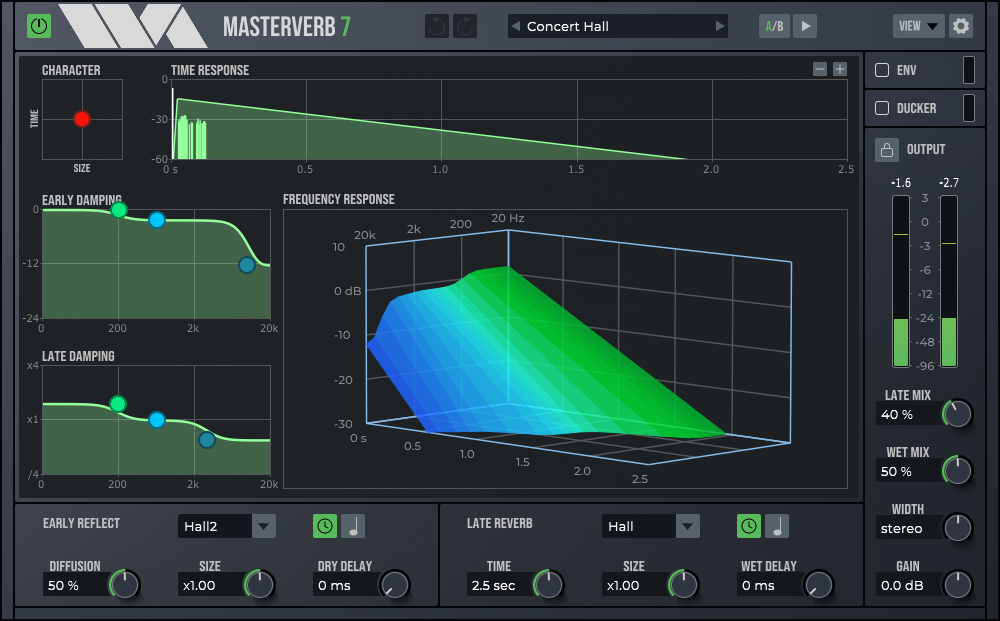
Wave Arts MasterVerb 7 is a powerful reverb plugin designed to create pristine-sounding spaces. It features two distinct algorithms – Hall and Plate – allowing for the recreation of a wide range of acoustic environments, from intimate rooms to expansive concert halls and dense plate reverbs, all with silky-smooth decays free from artifacts. With independent controls for early reflections and late reverberation, including adjustable size, decay time, and dual 3-band EQs, MasterVerb offers extensive flexibility for shaping the reverb's character. Its intuitive graphical interface, including a 3D frequency response plot, makes it easy to visualize and fine-tune settings. It includes a ducker to increase clarity of foreground sounds, an envelope processor to create gated and reverse reverb effects, and beat synchronized delay times.
FinalPlug 7:

FinalPlug combines a lookahead peak limiter with ITU BS.1770 loudness metering, making it an ideal plugin for audio mastering. It can be used as an insert effect to provide limiting for gain staging or volume maximization. Additionally, FinalPlug can be placed at the end of your mastering chain to ensure your audio meets loudness and true peak delivery requirements, making it a crucial component for achieving professional audio standards.
The FinalPlug interface could hardly be simpler. When used as a loudness maximizer, select a desired output ceiling level, say -0.1 dB, and then adjust the threshold level. As you decrease the threshold you increase the volume.
To meet loudness and true peak delivery standards, select the "Analyze" preset and then select a delivery target specification. This sets up the integrated loudness and true peak target levels. Then play your session. The integrated loudness and true peak levels are displayed as the music plays, and will be colored orange if they exceed the target levels. At the end of playback, click MATCH. This sets the limiter parameters to meet the target specification. Playing the session again will yield the desired integrated loudness level without exceeding the true peak level. You can now export your compliant audio.
MultiDynamics 7:

MultiDynamics is a versatile multi-band dynamics plugin that offers powerful capabilities for mastering, track processing, sound design, and noise reduction. Each of MultiDynamics' six bands can be individually configured for compression or expansion/gating, providing precise control over your audio. Whether you're looking to enhance the clarity of individual tracks or achieve a polished, professional sound during mastering, MultiDynamics is a valuable tool in any audio engineer's arsenal.
Multiband dynamics processing combines the techniques of equalization and dynamics processing, but is more powerful than a static equalizer or a single band dynamics processor. Multiband dynamics processing combines the techniques of equalization and dynamics processing, but is more powerful than a static equalizer or a single band dynamics processor. Below are some of the possible ways to use MultiDynamics:
- Frequency-Dependent Dynamics: A simple application of multiband dynamics is to apply compression or expansion to a specific frequency range. For example, you may want to compress the vocals in a mix without affecting the low frequencies (bass, kick drum) or high frequencies (snare, cymbals). This is easily done by creating a midrange band to cover the vocal range and setting it to compress.
- Level-Dependent EQ: You can also think of multiband dynamics as providing EQ which is dependent on the level of the input sound. For example, you might want to brighten the sound of a high hat, but only when the drums are played softly. This can be accomplished by setting up a high frequency band that increases gain when the input is below threshold. This is more powerful than using a shelving EQ which will change the tonal balance at all levels equally.
- Noise Reduction: nother powerful use of MultiDynamics is noise reduction. This is accomplished using multiple gating bands where the thresholds are set just above the ambient noise level. MultiDynamics excels at de-noising and doesn't suffer from artifacts typical of FFT-based de-noisers.
- Ducking: You can use MultiDynamics to duck music behind narration so the foreground dialog stays intelligible when mixed with the background music. Using a multiband processor allows the music to be ducked only in the frequency ranges where there is dialog energy, which makes for a more transparent effect.
What's New in MultiDynamics 7:
- All new interface with dark theme.
- Now supports extensive sidechain capability. Each dynamics band can be driven from the input signal or an external sidechain input. You can also specify wide-band or band-filtered signal, or select either the input or external signal filtered by a separate sidechain EQ. Hence you can drive one frequency band based on the signal from another frequency band.
- New Learn feature automatically sets band thresholds to detected peak or RMS levels.
- A peak limiter has been added to the output processing.
- Input meters and an input gain control have been added.
- User selectable display ranges for dynamics gain and input levels. New metering section with options for peak, peak & RMS, RMS, and K-system meters.
- Realtime spectrum display with many options.
Panorama 7:

Panorama is an advanced virtual acoustics plugin that delivers exceptionally lifelike auditory experiences suitable for both headphone and loudspeaker playback. Utilizing HRTF-based binaural synthesis and acoustic environment modeling technology, Panorama authentically replicates 3D sound propagation within physical spaces.
Panorama has many possible uses, including:
- 3D Audio Production: Insert Panorama on each track in a mix, and use Panorama to pan the individual sounds around in the virtual space. This works best for headphone mixes (think of the possibilities for podcasting), but the same concept can be used for loudspeaker playback. You can use the sequencer to set up motion trajectories for the sources, or simply automate them.
- Stereo Panning Effects: In conventional stereo mixes, sometimes you have a sound you want to treat specially. By applying 3D processing, Panorama can be used to create a panning effect that stands out from conventional power panning.
- Stereo "Auto-Pan" Effects: Panorama can work as a conventional stereo panner, and it has a powerful sequencer to automate pan positions. Hence you can create all sorts of modulating pan effects.
- Stereo Widening: Panorama can process stereo mixes to sound very wide when played back over loudspeakers.
- Virtual Monitoring: Panorama can be used to simulate stereo and surround playback for headphone playback.
NEW! Features of Panorama 7 include:
- The big new feature is the position sequencer, which can be used for trajectory automation and beat-synced musical effects (auto-pan). The sequencer works by panning the sound along a set of trajectory waypoints.
- All new UI look with dark theme.
- Larger UI area for panning, now including side and rear view options.
- Larger virtual area for panning. Previously Panorama 6 allowed from -10 to +10 feet, Panorama 7 allows from -100 to +100 feet.
- Zoom in/out control.
- Support for SOFA format HRIRs. SOFA (Spatially Oriented Format for Acoustics) is a standard file format used for interchange of head-related impulse responses. Support for SOFA data is provided via a conversion application called Sofa2Pan that converts from SOFA format to Panorama format.
- Improved support for third-party HRIRs: HRIRs are specified by filename and are sample rate converted to the session rate when loaded.
- Implemented “Near Head Model”. This improves reproduction accuracy for positions close to head by applying additional head shadowing based on a spherical head model.
- Added “Stereo Pan” HRIR to implement traditional stereo panning.
- Added “Stereo Passthru” HRIR to implement proper binaural to loudspeaker conversion.
ThinkEDU Exclusive Freebie! Includes Avid Pro Tools Studio 1-Year Subscription for Students & Teachers (Download) (A $299 Value) at NO Charge.
Pro Tools Studio is the core of a complete music production system, providing the creative canvas to produce larger, more compelling music with ease. Get the advanced features and workflows music professionals need to take projects further, including the ability to work with up to 512 audio tracks, plus surround and immersive audio mixing capabilities.


)